Call from real lists
Start with a queue from your CRM contacts, saved filters, imported lead lists, or nurture segments.
Work through lead lists, keep contact context open, log outcomes, and make calls from desktop or the CloseDaily mobile app.
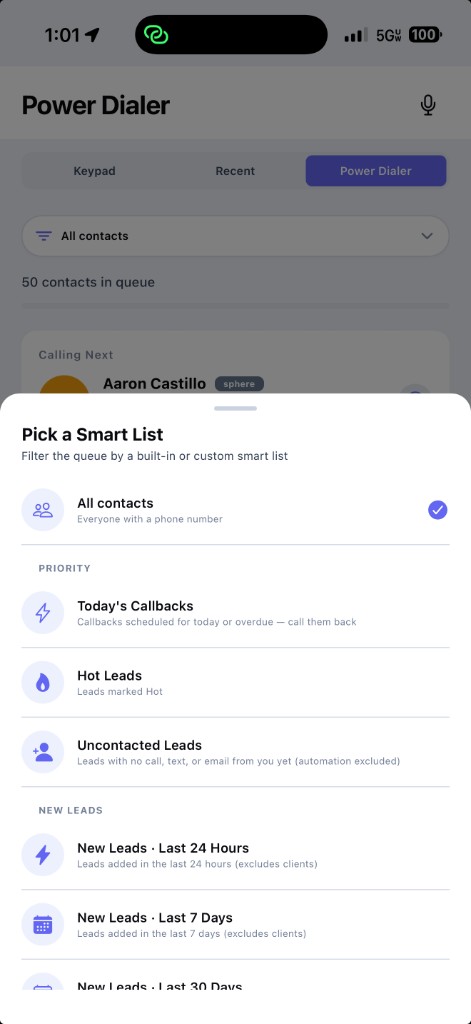
The dialer sits inside the same CRM your leads, notes, stages, tasks, listing-alert engagement, search-link activity, and follow-up already live in.
Start with a queue from your CRM contacts, saved filters, imported lead lists, or nurture segments.
See who you are calling, where they came from, and what happened before you pick up the conversation.
Capture call outcomes, notes, next steps, and history without bouncing between phone software and a separate CRM.
Use the CloseDaily mobile app when you are between showings, on the road, or away from your desk.
Most standalone dialers create another place for agents to work. CloseDaily keeps the call, the contact, and the next action together on web and mobile.
Standalone dialers can make calls. The hard part is keeping the sales process organized after each conversation.
Start a free trial if you are ready to jump in, or book a short walkthrough to see how call queues, notes, smart lists, and follow-up work together inside CloseDaily.
A real estate power dialer should make daily outreach easier, not create another disconnected system to babysit.
When a lead registers on your IDX website, landing page, or ad funnel, speed matters. Build a smart list for new leads, call them while intent is fresh, then log the outcome on the contact record.
Work through seller prospecting lists with the contact details, property context, notes, and next step in one place. After the call, move the lead into the right nurture or follow-up workflow.
Call past clients before birthdays, home anniversaries, market updates, referral campaigns, or post-transaction check-ins. Every note stays tied to the relationship instead of getting lost in a spreadsheet.
After an open house, filter attendees by interest level and call the hottest prospects first. Keep showing feedback, buyer timeline, and next steps attached to the same CRM profile.
Pull a list of older buyer and seller leads that have gone quiet. Call the segment, update the status, and restart the right drip or task plan based on what they say.
Set a focused call block, choose the list, and work through it from desktop or mobile without switching tools. The point is simple: more conversations and cleaner follow-up data.
The calling tool is strongest when it is connected to lead source, pipeline stage, scripts, notes, and compliance history.
Build call lists from contacts already in CloseDaily: new leads, seller prospects, buyer nurtures, past clients, open house attendees, or any smart list you create.
See lead stage, contact temperature, source, notes, and call history before you speak. That context helps agents sound prepared instead of generic.
Track whether the call connected, went to voicemail, needs a callback, or should move into another follow-up plan. Clean outcomes make future lists better.
Pair calling sessions with your real estate scripts for expired listings, FSBOs, referrals, buyer consults, and old lead reactivation.
Keep calls and texts from web and mobile connected to the same business phone identity so conversations are easier to review and follow up later.
Calling software should support consent, opt-outs, and do-not-call discipline. CloseDaily keeps outreach tied to contact records so agents can work more carefully.
Import contacts, build a smart list, and use the Power Dialer to turn quiet lead data into live conversations. Try it yourself or ask us to walk you through it.
Build the full workflow around the dialer: find the right people, segment the list, use the right script, and keep outreach compliant.
Related articles for agents using the dialer: speed-to-lead, follow-up, lead capture, CRM, and prospecting workflows.
Yes. The Power Dialer is the live CloseDaily calling workflow for working through real estate lead lists.
No. The Power Dialer helps agents make calls themselves. The AI Dialer is a separate coming-soon product.
Yes. That is the point of the product. The dialer works with your CRM contacts, details, call notes, and follow-up history.
Yes. CloseDaily supports calling from the mobile app, so agents can make calls, review contact context, and keep follow-up history connected while they are away from their desk.
Agents commonly use the Power Dialer for new internet leads, FSBOs, expired listings, past clients, open house attendees, old nurture leads, and follow-up campaigns.
No. The dialer is for high-intent conversations. Follow-up automation keeps the relationship warm after the call with tasks, texts, email drips, and reminders.
Start with CloseDaily and keep every lead conversation tied to the contact record.