Text from the contact record
Keep the conversation next to notes, lead status, activity history, property interest, and tasks.
Keep one-to-one texts, bulk SMS, follow-up sequences, opt-outs, and contact history inside CloseDaily on desktop and mobile.
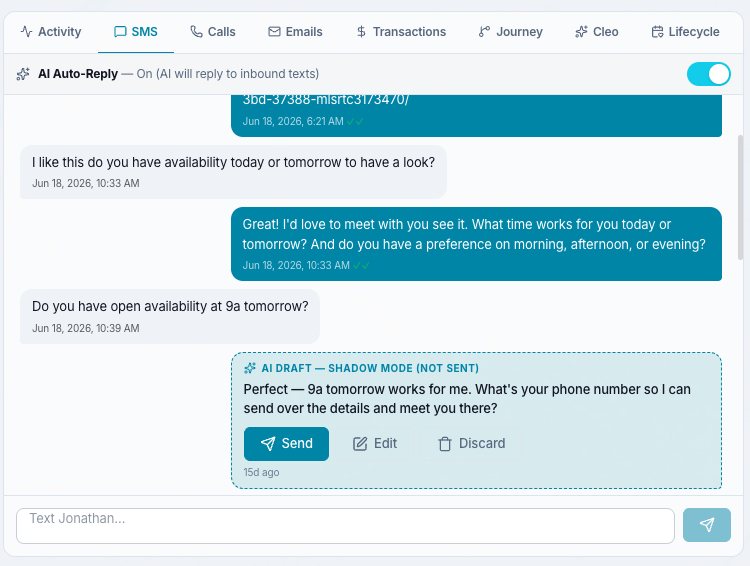
Agents can keep the same business-texting workflow moving from the CloseDaily mobile app, with conversation context still attached to the contact record.
Real estate texting works best when every message is connected to the lead source, property interest, stage, and next step.
Keep the conversation next to notes, lead status, activity history, property interest, and tasks.
Separate client communication from your personal phone while keeping replies routed to the CRM.
Use texts alongside calls, emails, drips, and tasks so the entire relationship stays organized.
Reply from your phone while you are showing homes, driving between appointments, or away from your desk.
Most agents text from scattered places: personal phones, inboxes, lead apps, and spreadsheets. CloseDaily turns text messaging into part of the CRM workflow on web and mobile.
Start a free trial if you are ready to test it, or book a demo and we will walk through lead capture, one-to-one texting, SMS follow-up, and opt-out handling.
Texting is not a replacement for calls, email, or nurture. It is the fastest way to create a small reply that moves the relationship forward.
Send an immediate first touch when a new buyer or seller lead registers, clicks a search link, asks for a showing, or submits a form.
Text attendees after the event while the property is still fresh, then tag replies for buyer follow-up.
Send targeted updates to smart lists when a matching property, price change, or open house hits your market.
Stay in touch around home anniversaries, market updates, referral asks, and neighborhood activity.
Follow up with valuation leads, FSBOs, expireds, and old seller prospects without losing the conversation history.
Send reminders before showings, consultations, listing appointments, inspections, and closing tasks from desktop or the mobile app.
Text individual leads and clients from desktop or mobile with conversation history saved to the contact.
Use the CloseDaily mobile app to read, reply, and keep lead conversations moving when you are not at your computer.
Send targeted messages to contacts by tag, source, lead score, pipeline stage, or recent activity.
Use reusable text templates for speed-to-lead, open houses, listing alerts, showings, and referral asks.
Mix texts with emails, reminders, and tasks so leads keep hearing from you after the first touch.
Respect STOP replies, opt-outs, and contact preferences so your outreach stays organized and careful.
Keep texts connected to calls, voicemail, notes, and activity on the same real estate contact record.
Texting works best when it is connected to lead capture, speed-to-lead, long-term follow-up, and CRM segmentation.
Related articles for agents using SMS with lead capture, speed-to-lead, business phone history, and long-term follow-up.
Yes. SMS texting is part of the CloseDaily communication workflow for real estate leads and clients.
Yes. CloseDaily is designed around a dedicated business phone identity, so texts and calls can stay connected to your CRM instead of your personal device.
Yes. The CloseDaily mobile app supports SMS texting so agents can read and reply to lead conversations while they are away from their desk.
You can text targeted segments and smart lists, but outreach should respect consent, opt-outs, and message quality. The best SMS campaigns are relevant, timely, and tied to the lead's actual interest.
Common use cases include speed-to-lead responses, showing coordination, listing alerts, open house follow-up, past client touches, appointment reminders, and nurture check-ins.
Start with CloseDaily and keep every conversation tied to the contact record.